


Every November I sketch spring windows while the Christmas schemes are still going in. This year the brief came from Hollin & Vane, a fictional independent department store, for a spring 2027 campaign called “Fresh Ground”. Before anyone signs off a print order or a joinery quote, the buying and marketing teams want to see the window, the in-store signage and the digital screens as one family.
Normally that means mood boards and, if the budget stretches, a 3D concept render from a visualiser, which in my experience is a few days’ turnaround and a three-figure sum per view. This time I ran the concepts through four image models available today on one API: Nano Banana Pro, Nano Banana 2, Nano Banana 2.1 and Nano Banana 2 Lite. All images below are my own test outputs and are labelled with the model that made them.
The four tests
All requests used 1K and identical prompts. I recorded the time to finished image and what my account was billed per 1K image: $0.110 for Pro, $0.054 for Nano Banana 2, $0.032 for 2.1 and $0.034 to $0.037 for Lite.
- Window concept (4:3). A high-street window with oversized paper-craft tulips in sage and blush, raw plywood plinths, terracotta pots and two display forms in linen shirts. Window vinyl reading “Fresh Ground” and “Spring Collection – In Store 6 March”.
- Materials close-up (1:1). One paper tulip in a terracotta pot on a plywood plinth beside a folded linen shirt, for the build team.
- A-board sign (3:4). Each model was given its own window image as a reference and asked for a matching in-store A-board reading “Fresh Ground”, “Linen Shirts £35”, “2 for £60”, “Spring Collection”.
- Digital screen (9:16). Same reference, portrait screen graphic reading “Fresh Ground”, “Spring Collection”, “In Store 6 March”.
Windows: lettering right, shopfronts wrong
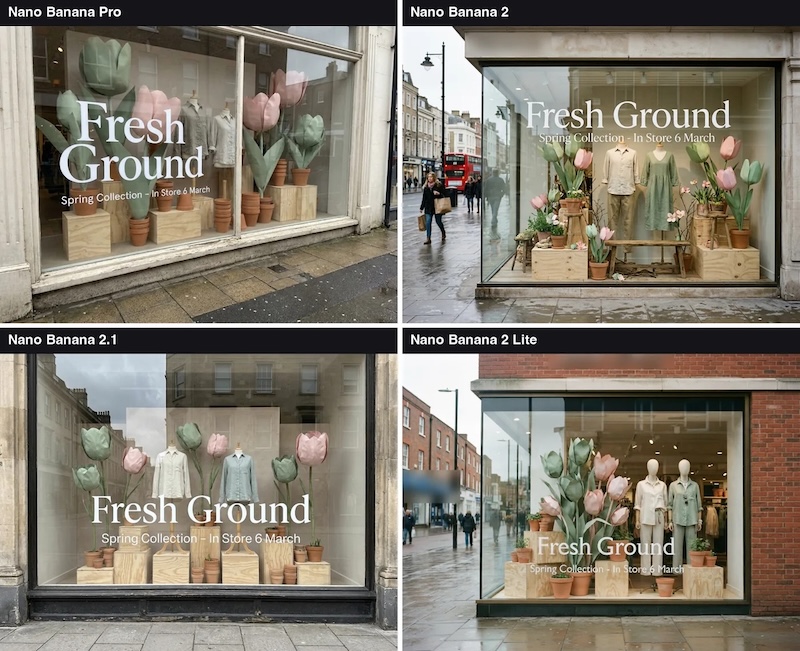
Test 1. Top: Nano Banana Pro, Nano Banana 2. Bottom: Nano Banana 2.1, Nano Banana 2 Lite. Real store names the models painted on two fascias have been blurred.
All four spelled both lines of window vinyl correctly. Placement varied. Nano Banana 2 (15.0 seconds) put the lettering high on the glass, clear of the props, which is exactly how I would spec it. Nano Banana Pro (22.0 s) and Nano Banana 2.1 (43.0 s) set it across the tulip stems and mannequins: readable, but it fights the display. Lite (4.6 s, $0.037) ran the strapline over the pots and plinths, the weakest of the four.
The bigger problem was the building. I asked for a generic high-street window. Nano Banana 2 painted the name of a real department store on the fascia, and Lite painted another real retailer’s name above the door plus a real chain’s sign further down the street. I have blurred them, and anyone using these tools for client boards needs to check every fascia and street sign before a concept leaves the studio.
Materials: can the build team read it?
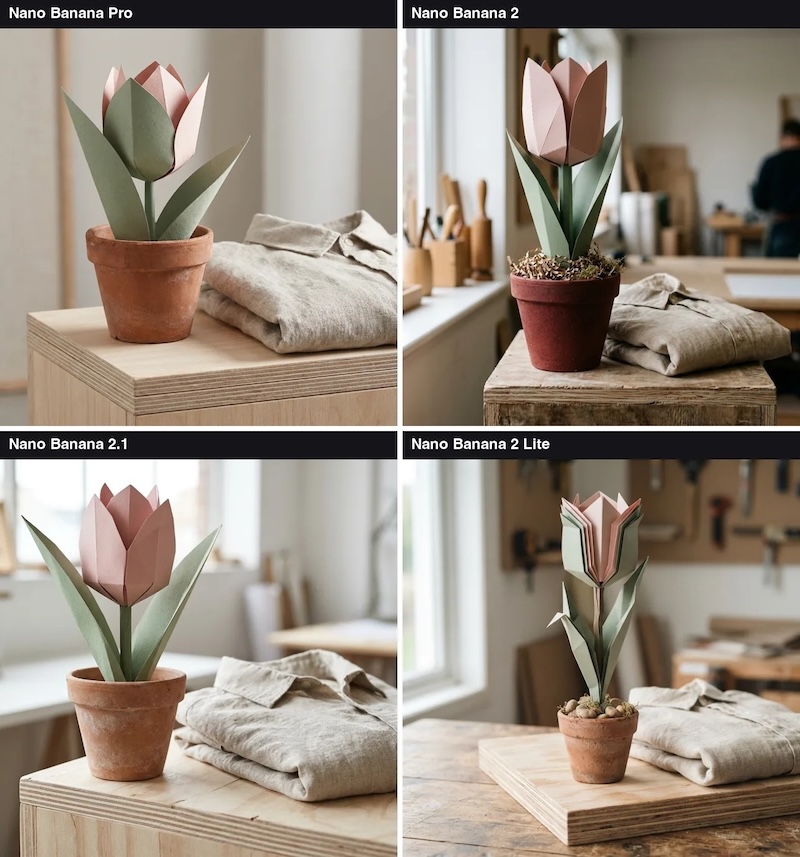
Test 2. Top: Nano Banana Pro, Nano Banana 2. Bottom: Nano Banana 2.1, Nano Banana 2 Lite.
I scored four things a joiner or prop maker would look for: visible card folds, ply layers on the plinth edge, a terracotta pot that reads as terracotta, and a linen weave. Nano Banana Pro and Nano Banana 2.1 scored 4 of 4, with crisp ply edges and believable folded card, detail I am excited to see carried into the Nano Banana Pro 2 image API so a prop maker could quote from it. Lite scored 3: its tulip was an odd stacked-card construction. Nano Banana 2 scored 2, giving me a deep red pot and a rough timber block with no ply edge. One honest note: Pro’s first attempt at this harmless prompt was refused by the content safety check. It was not charged, and the identical prompt went through on a retry in 32.5 seconds.
Signage and screens: keeping the family together
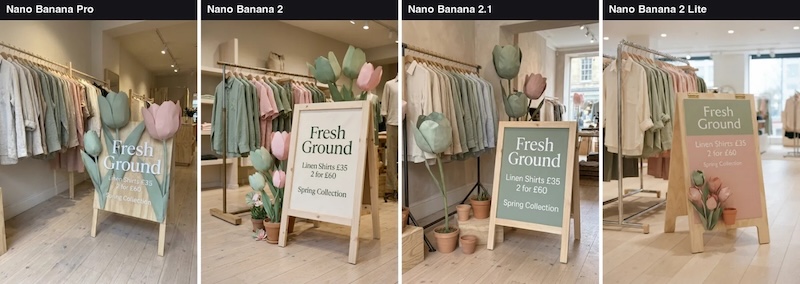
Test 3. Each A-board was generated from that model’s own window image.
I expected trouble with pound signs and prices, and there was none: every model got all four lines right, including both “£” figures. Across tests 1, 3 and 4 that is nine text lines per model and nine of nine correct for all four models. The differences were in legibility at distance. Nano Banana 2.1’s sage board with white type (53.7 s) and Lite’s two-tone board (8.4 s) would read across a shop floor; Nano Banana Pro’s (32.9 s) set the prices small beside tulips that grow over the board edge.
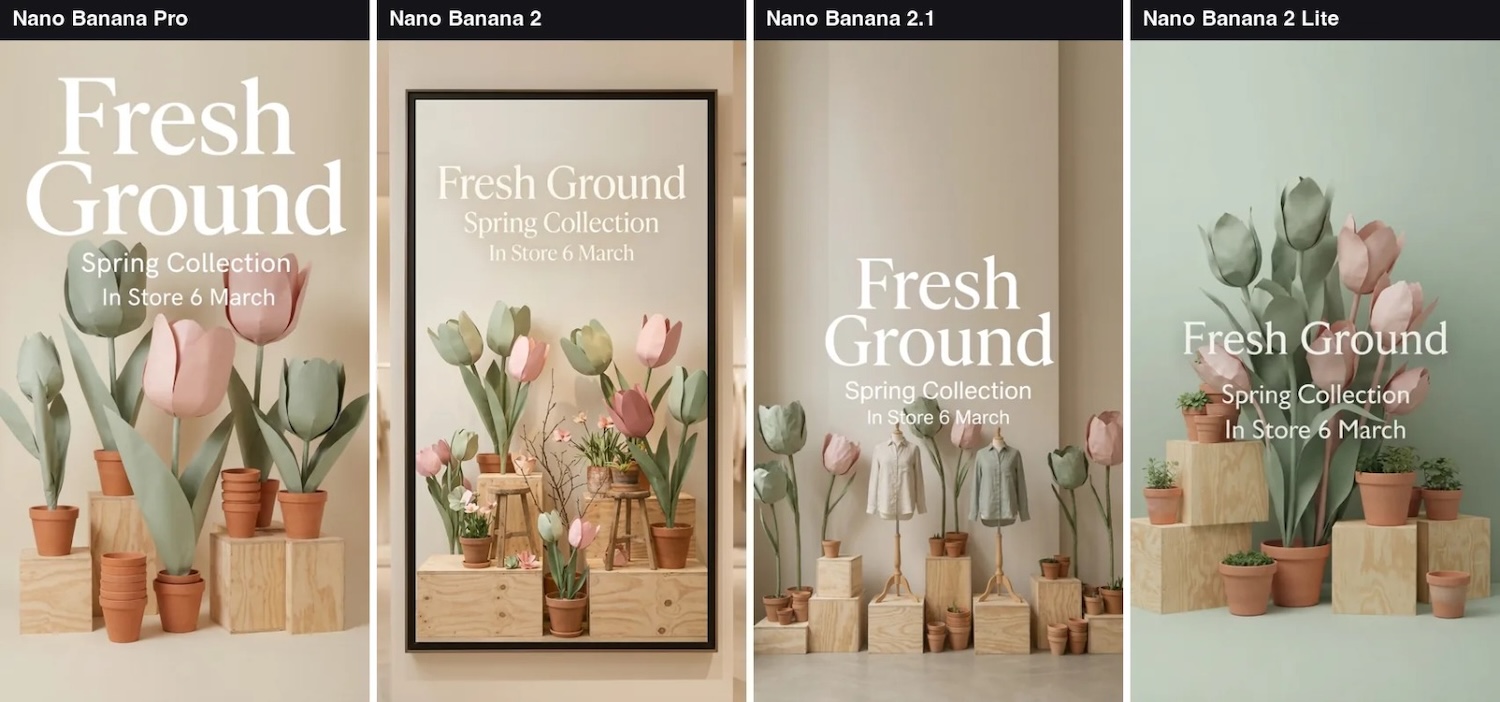
Test 4. Portrait screens, again built from each model’s own window.
On the screens, Nano Banana Pro took the longest single request of the test at 64.4 seconds but produced the most poster-like layout. Nano Banana 2 (15.4 s) cleverly showed the graphic on a wall-mounted screen, handy for a presentation. Lite (8.8 s) placed the headline over the tulip heads, which would not survive a busy store.
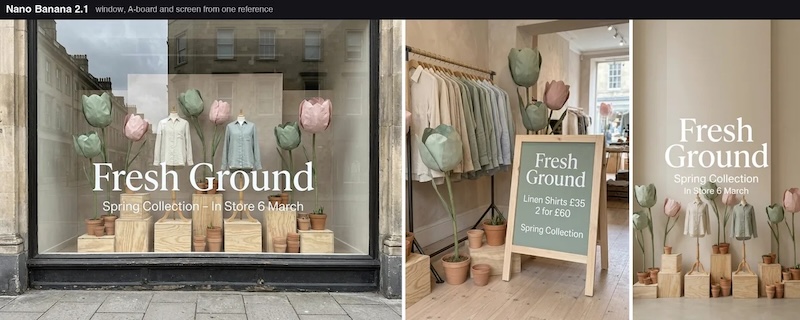
The most consistent set: window, A-board and screen from Nano Banana 2.1.
For consistency across window, POS and screen, Nano Banana 2.1 was the best of the current versions: same tulip shapes, same plinths, same type. One reliable model for the whole campaign family is what I most want from Pro 2.
Scores, time and cost
| Model | Board-ready of 4 | Median time | Spend |
| Nano Banana Pro | 4 (one refusal first) | 33 s | $0.44 |
| Nano Banana 2 | 2 | 15 s | $0.216 |
| Nano Banana 2.1 | 4 | 48 s | $0.128 |
| Nano Banana 2 Lite | 1 | 7 s | $0.143 |
The whole exercise came to about $0.93, and 2.1 was cheapest per board-ready image. That is not a replacement for a visualiser’s render of the real store, with real window dimensions and sightlines. It is a way to arrive at that meeting with three directions already narrowed to one.
What I am preparing for Pro 2
The Nano Banana Pro 2 page says only that it is coming, that until launch the workspace uses current Nano Banana Pro parameters (legible text in many languages, up to 14 reference images, up to 4K output), and that requests prepared now are meant to run when it goes live. I am hoping it combines Pro’s material detail with 2.1’s consistency and stops inventing shop fascias, but I will test that rather than assume it. Meanwhile I have:
- saved all four prompts with the quoted copy, so they can be re-run unchanged;
- built a reference pack: the chosen window, a colour card, and a photo of the client’s real fascia so the model has no reason to invent one;
- kept a checklist: nine text lines, four material points, a fascia and street-sign check;
- labelled every board “AI concept, not final build” for the client.
When Pro 2 lands, the spring boards get re-run first, and the build budget conversation starts from there.